v0.0.3 Patch Notes — Persistent World, Copy/Paste, Guidebook, Task Manager, and more
v0.0.3 is a significant update with a host of features and fixes, including: copy/paste support, a new guidebook and task manager, hardware limits, a persistent Net, client fixes, and more
After a wonderfully buggy round of closed playtesting, we've made a significant number of updates to both the game client and the MMO server itself, and are continuing the lay the foundations for the next steps of the Net.
World Persistence
Starting today, all player machines will remain connected and pingable on the Net by default. That means PvP is finally enabled.
(we also fixed a firewall bug that prevented hacking anyone lol)
Guidebook
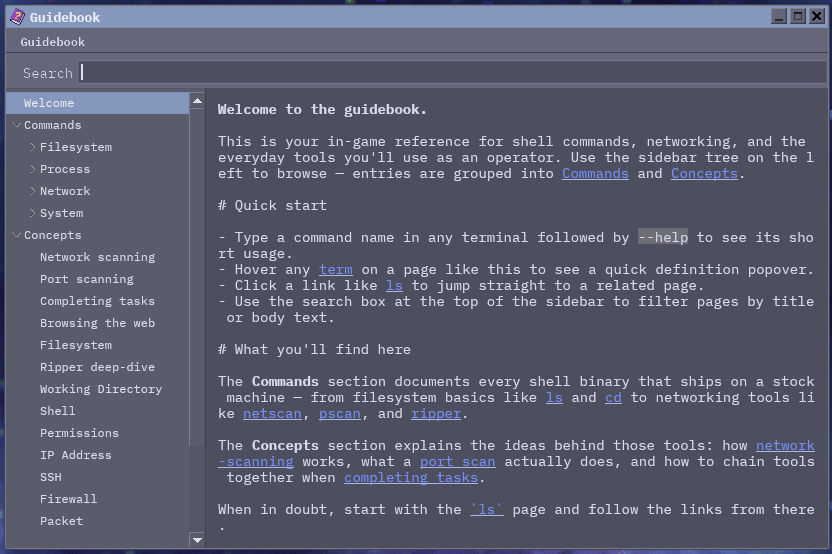
We've introduced a guidebook companion app, now available in the start menu, that aims to be a
detailed reference for all kinds of things computer related. Commands, networking concepts, guides
for cracking passwords with ripper – it's all there!
Markdown Rendering
To ensure that we can properly emphasize certain things in emails and applications, we've added support for basic markdown formatting, supporting monospace, bold, underline, and italic.
Copy / Paste Support
The game client now properly supports reading from the clipboard (upon request), and writing to your real OS's clipboard; allowing you to easily transfer info in/out of the game client and into whatever your preferred notetaking app is.
Hardware Limits
Launching processes on your game's machine will now consume CPU and RAM, which fluctuates. This also introduces the foundations for our upcoming items system, hardware upgrades, and more. You can manage this from the new Task Manager application.
Task Manager
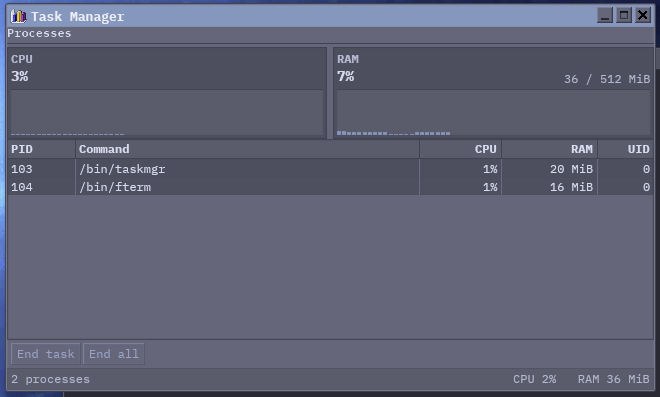
To help you manage and view your new resource limits, we've added a task manager application so that you can
easily manage processes using a GUI if ps aux isn't your style.
Graphical Improvements
The game client now feels more responsive and dragging windows will now feel snappy and instant with our new window compositor implementation. The game client will also now respect your VSync / framerate settings.
Lock Machine / Shutdown
With world persistence, comes balancing.
- Lock Machine
- Locking your machine will now preserve all your running applications.
- When you return to your machine later, everything will have progressed based on the amount of time passed
- Shut Down
- Closes all processes and shuts down your machine
- Your machine will remain offline to the Net until your next login
This means that if you want to run a long running bruteforce with ripper against a tough target, and it might
take a few hours, you can lock your machine and come back later to it being finished!
If you would like to be more defensive, you can instead Shut Down your machine. Which will close all applications and any running processes you have, and make your machine unavailable on the Net until you decide to log in again. A simple tradeoff.
Changelog
Client
- DWM
- Introduced copy / paste support
- The DWM now properly persists window position and size in the database
- Improved bounding so that windows can't be dragged outside of the DWM area
- Improved constraints so that windows don't render outside the DWM on a large resize
- Improved freeing of graphical resources when a window is closed
- Improved element input focus behavior
- Improved respect for the player's theme / appearance settings
- Improved keyboard navigation / focus handling
- Refactored all apps to our new
app_uiframework - The time shown in the taskbar will now match your local machine's time
- GPU / Graphics
- Slop removed, now a real window compositor
- Improved GPU rendering regarding filled gradient rects
- Login
- Better respect for previously set volume settings
- Refactored to use our new UI components library
- Music would not resume when being returned to the login screen
- Mail
- Improved scrollbar handling through a unified scrolling implementation
- Terminal
- Better jump handling when deciding to type again after being scrolled up in the window
- The blinking cursor is no longer visible when scrolling up
- Installer
- The installer now closes properly upon finishing registration
- File Picker
- Using a space in the filename no longer emits a filename with duplicated spaces
- Browser
- Fixed certain pages overflowing their window (doubly fixed by real window compositing)
- Edit
- No longer buffers to the server every character, only on save
- Guidebook
- Introduced Guidebook application
- Task Manager
- Introduced Task Manager application
Server
- Server
- Fixed a server crash related to multibyte chars
- Fixed another undiscovered crash related to multibyte chars
- Introduced monitoring instrumentation
- Introduced items implementation
- Netcode
- Removed clipboard packet type from protocol
- Reduced MTU to 1200 for common VPN/Wireguard support
- Machine
- Introduced hardware limits and OOM implementation
- Introduced hardware slots
- VFS
- You can no longer save a file with no characters in the name
ping- Removed leftover packet debugging line in
ping
- Removed leftover packet debugging line in
ssh- Improved render handling of
\r\nwhen using thesshcommand
- Improved render handling of
pscan- Improved network firewall matching behavior for more accurate results
- Fixed a deadlock when scanning your own IP
ls- Fixed some rendering issues when using color codes
scp- Fixed a deadlock in certain conditions